External Secret Operator
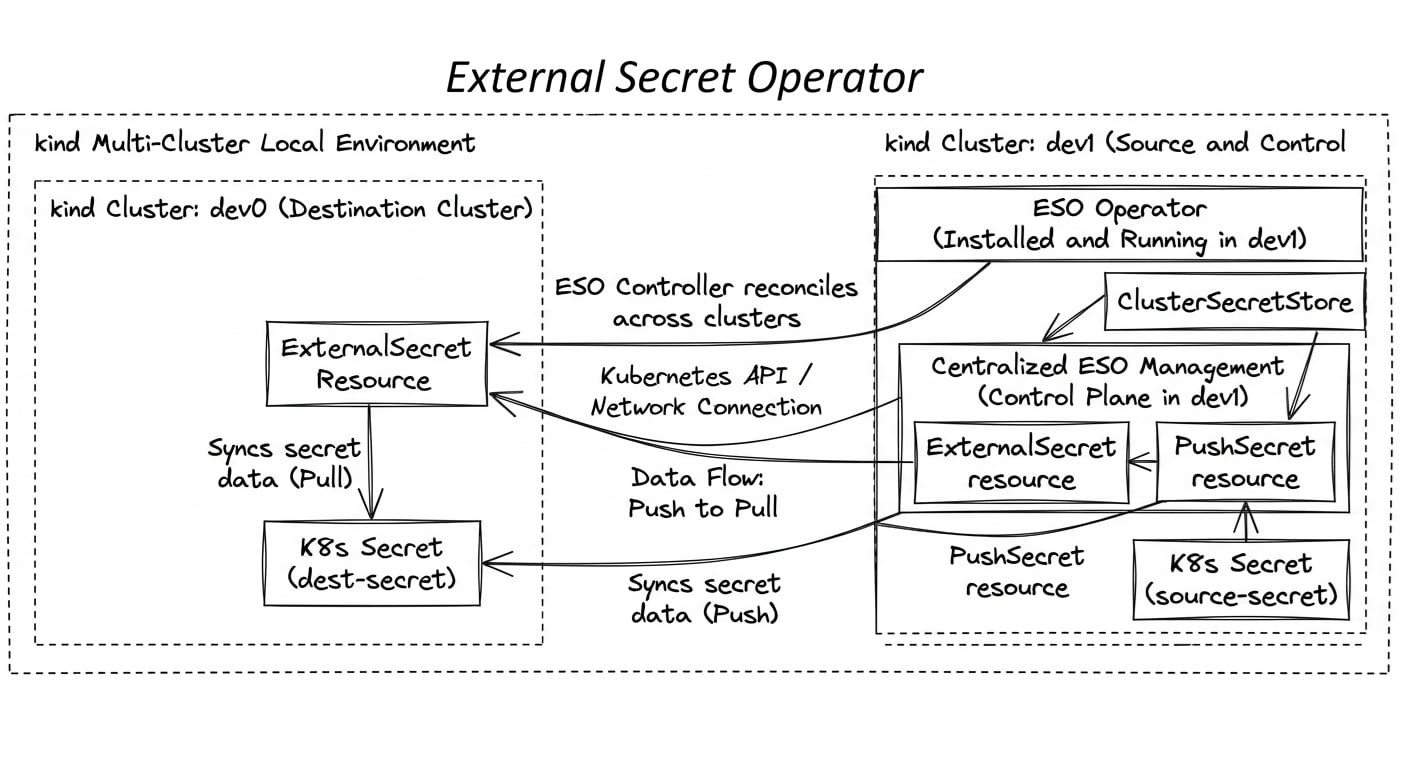
Pull and Push secrets using ESO between KinD Kubernetes clusters
Recently had to use External Secret Operator (ESO) for a requirement to copy secrets from one cluster to another. To understand and learn the configuration have used two kind cluster to detail the setup which can be done locally.
The steps detailed below focus on copying secrets from namespace only since SecretStore resource of ESO is namespace scoped. For cluster scope ESO has ClusterSecretStore resource, refer the documentation for more details.
The two KinD cluster in this case are named dev0 and dev1. The ESO will be installed in the one cluster in this case on dev1 cluster. For ESO to connect to the dev0 cluster it requires certificate info to be created as a secret fetched from the kube config file. The KinD CLI will update the config automatically under the ~.kube folder once the clusters are created.
The SecretStore resource configures the secret with the certificate info which will be used by ESO controller. The ExternalSecret resource is configured to pull the secret from dev0 cluster from specified namespace to the dev1 cluster, the secret should be created and available in the dev0 namespace else we don't see the secrets in the namespace. PushSecret resource is configured to push the secret created in the namespace on dev1 cluster to dev0 cluster on to specific namespace.
Prerequisites
KinD CLI
Kubectl CLI
helm CLI
YQ CLI (optional)
Summary
Two kind cluster is created dev0 and dev1
The ESO operator is deployed using helm chart on the dev1
The certificate of the target cluster in this case dev0 is included in a secret and created in the dev1 cluster
The SecretStore is configured on the namespace where the secret needs to be pushed and pulled
The ExternalSecret resource of ESO is used for pull secret from target cluster
The PushSecret resource of ESO is used for pushing secret to the target cluster
Use case demonstrates is configure
Pull the secret from the cluster kind-dev0 to kind-dev1
Push the secret from the cluster kind-dev1 to kind-dev0
Create kind cluster
With below command we can create two kind cluster
# file name: kind_dev0.yaml and kind_dev1.yaml (config remains same for both the clusters)
apiVersion: kind.x-k8s.io/v1alpha4
kind: Cluster
nodes:
  - role: control-plane
  - role: worker
  - role: worker
  - role: worker
kind create cluster --name dev0 --config kind_dev0.yaml
kind create cluster --name dev1 --config kind_dev1.yaml
Install the ESO operator
The ESO operator is installed using helm chart. Add the helm repo before installing.
The command to add the helm repo
helm repo add external-secrets https://charts.external-secrets.io
helm repo update
The KinD CLI updates the kube config once created, in this case the Docker daemon installed and running in the WSL2. After the clusters is installed the context can be listed using kubectl config get-contexts command. the kind cluster name dev1 will be created as kind-dev1 by KinD CLI.
Helm command to install ESO on the external-secrets namespace
helm upgrade --install external-secrets \
   external-secrets/external-secrets \
    -n external-secrets \
    --create-namespace \
	--set installCRDs=true \
	--kube-context kind-dev1
Create a namespace to pull and push secrets from clusters
The namespace is created in the kind-dev1 cluster
kubectl --context kind-dev1 create ns eso-demo
Create the secret with the certificate of the target cluster
The kind-dev0 is the target cluster, configure the certificate in the secret and deploy it in the kind-dev1 cluster the ESO will use this certs to connect to the target cluster. Below command will fetch the certificate info from the kubeconfig, we fetch the details from the kind-dev0 and deploy it to the eso-demo namespace on the kind-dev1 cluster.
kubectl config view --raw -o jsonpath="{.users[?(@.name=='kind-dev0')].user.client-certificate-data}" | echo "apiVersion: v1
kind: Secret
metadata:
  name: dev0-cluster-secrets
type: Opaque
data:
  certificate-authority-data: $(kubectl config view --raw -o jsonpath="{.clusters[?(@.name=='kind-dev0')].cluster.certificate-authority-data}")
  client-certificate-data: $(kubectl config view --raw -o jsonpath="{.users[?(@.name=='kind-dev0')].user.client-certificate-data}")
  client-key-data: $(kubectl config view --raw -o jsonpath="{.users[?(@.name=='kind-dev0')].user.client-key-data}")" |  kubectl --context kind-dev1 -n eso-demo apply -f -
Create the SecretStore
To create SecretStore resources the certificate secret created in above step needs to be used, the key name should be configured as mentioned in the comments below. The dev0 cluster URL needs to be obtained, not to use the default context URL from the kubeconfig sine it will use loopback IP address. To get the name of the actual cluster URL, we can use the following command
kind get kubeconfig --name=dev0 --internal
The get the server URL value we can use yq cli, which returns the value. Note, the command will return the docker control-plane controller name. In this case it would be https://dev0-control-plane:6433.
kind get kubeconfig --name=dev0 --internal | yq '.clusters[0].cluster.server'
The SecretStore resource is listed below and should be deployed to the namespace eso-demo of kind-dev1 cluster.
# file name: eso-secret-store-example.yaml
apiVersion: external-secrets.io/v1
kind: SecretStore
metadata:
  name: eso-example
spec:
  provider:
      kubernetes:
        remoteNamespace: postgres
        server:
          url: https://dev0-control-plane:6443
          caProvider:
            type: Secret
            name : dev0-cluster-secrets       # name of the secret with the dev0 certificate
            key: certificate-authority-data   # key from the secret with the dev0 certificate
        auth:
          cert:
            clientCert:
                name: dev0-cluster-secrets    # name of the secret with the dev0 certificate
                key: client-certificate-data  # key from the secret with the dev0 certificate
            clientKey:
                name: dev0-cluster-secrets    # name of the secret with the dev0 certificate
                key: client-key-data          # key from the secret with the dev0 certificate
To deploy use below command
kubectl --context kind-dev1 -n eso-demo apply -f eso-secret-store-example.yaml
Create the ExternalSecret resource
The ExternalSecret manifest is used to pull the secret from the kind-dev0 cluster. Install the manifest to kind-dev1 cluster in eso-demo namespace.
# file name: eso-external-secret-to-pull-from-dev0-to-dev1.yaml
apiVersion: external-secrets.io/v1
kind: ExternalSecret
metadata:
  name: example-pull-secret
spec:
  refreshInterval: 1h
  secretStoreRef:
    kind: SecretStore
    name: eso-example      # name of the SecretStore
  target:
    name: secret-example   # name of the k8s Secret to be created in kind-dev1 once pulled from kind-dev0
    creationPolicy: Owner  # Overwrites/deletes manual edits
  data:
  - secretKey: extra
    remoteRef:
      key: secret-example  # secret name on the remote
      property: extra      # property
Install the ExternalSecret to the namespace where the secrets from the kind-dev0 to be pulled.
kubectl --context kind-dev1 -n demo-eso apply -f eso-external-secret-to-pull-from-dev0-to-dev1.yaml
Now since the External secret is applied we should be able to see the secret getting created in the cluster kind-dev1 automatically on the eso-demo namespace.
To troubleshoot for any errors check the controller logs in this case we installed via helm in external-secrets namespace the pod logs will help fixing any issues occurs in the configuration. Below error message indicates that kind-dev0 cluster didn't have the secret in the remoteNamespace configured on the ExternalSecret manifest.
{"level":"error","ts":1789242957.7308912,"msg":"Reconciler error","controller":"externalsecret","controllerGroup":"external-secrets.io","controllerKind":"ExternalSecret","ExternalSecret":{"name":"example-pull-secret","namespace":"eso-demo"},"namespace":"eso-demo","name":"example-pull-secret","reconcileID":"f1768527-da2b-455e-9396-7ed4a6fc975b","error":"error processing spec.data[0] (key: secret-example), err: secrets \"secret-example\" not found"...
Create the secret in the target cluster under the configured namespace
When below secret resources is deployed to the kind-dev0 cluster on the eso-demo namespace, it will be copied to the kind-dev1 cluster to the configured namespace using the ExternalSecret resource configuration.
# file name: secret-in-dev0.yaml
apiVersion: v1
kind: Secret
metadata:
  name: secret-example
data:
  extra: ZXhhbXBsZQ==  # example
Install the secret in the kind-dev0 cluster eso-demo namespace using below command
kubectl --context kind-dev0 -n eso-demo apply -f secret-in-dev0.yaml
Create PushSecret to push the secret to target cluster
The PushSecret resource can be used to push the secret from the current cluster to target cluster using ESO resources. In this case the secret created kind-dev1 cluster eso-demo namespace will be pushed to the kind-dev0 cluster eso-demo namespace. The Secret and PushSecret resource manifest looks like below.
Additionally, in below the secret content it modified and then created. This is with reference to the latest ESO documentation itself.
---
# file name: eso-push-secret-demo.yaml
---
# The source secret to be pushed to the destination secret by PushSecret.
apiVersion: v1
kind: Secret
metadata:
  name: pushsecret-example
  namespace: eso-demo
stringData:
  eso-test-dest: "testing"
---
apiVersion: external-secrets.io/v1alpha1
kind: PushSecret
metadata:
  name: pushsecret-example # Customisable
  namespace: eso-demo # Same of the SecretStores
spec:
  updatePolicy: Replace # Policy to overwrite existing secrets in the provider on sync
  deletionPolicy: Delete # delete the provider secret when the PushSecret is deleted (default: None, which keeps it)
  refreshInterval: 1h0m0s # Refresh interval for which push secret will reconcile
  secretStoreRefs: # A list of secret stores to push secrets to
    - name: eso-example  # name of the secret store
      kind: SecretStore
  # Exactly one of selector.secret or selector.generatorRef may be set.
  selector:
    secret:
      name: pushsecret-example # Source Kubernetes secret to be pushed
  template:
    metadata:
      annotations: {}
      labels: {}
    data:
      # If the key source secret key has dashes, it cannot be accessed directly,
      # and the "index" function should be used.
      new-eso-test: '{{ index . "eso-test-dest" | toString | upper }} added when pushing to dev0'
  data:
    - conversionStrategy: None # Also supports the ReverseUnicode strategy
      match:
        # The secretKey is used within PushSecret (it should match key under spec.template.data)
        secretKey: new-eso-test
        remoteRef:
          remoteKey: destination-secret # The destination secret object name (where the secret is going to be pushed)
          property: eso-test-dest # The key within the destination secret object.
Apply the above configuration to kind-dev1 cluster using below command
kubectl --context kind-dev1 -n eso-demo apply -f eso-push-secret-demo.yaml
Once the resources is deployed, we should be able to see the secrets pushed to the target cluster.